

 11
11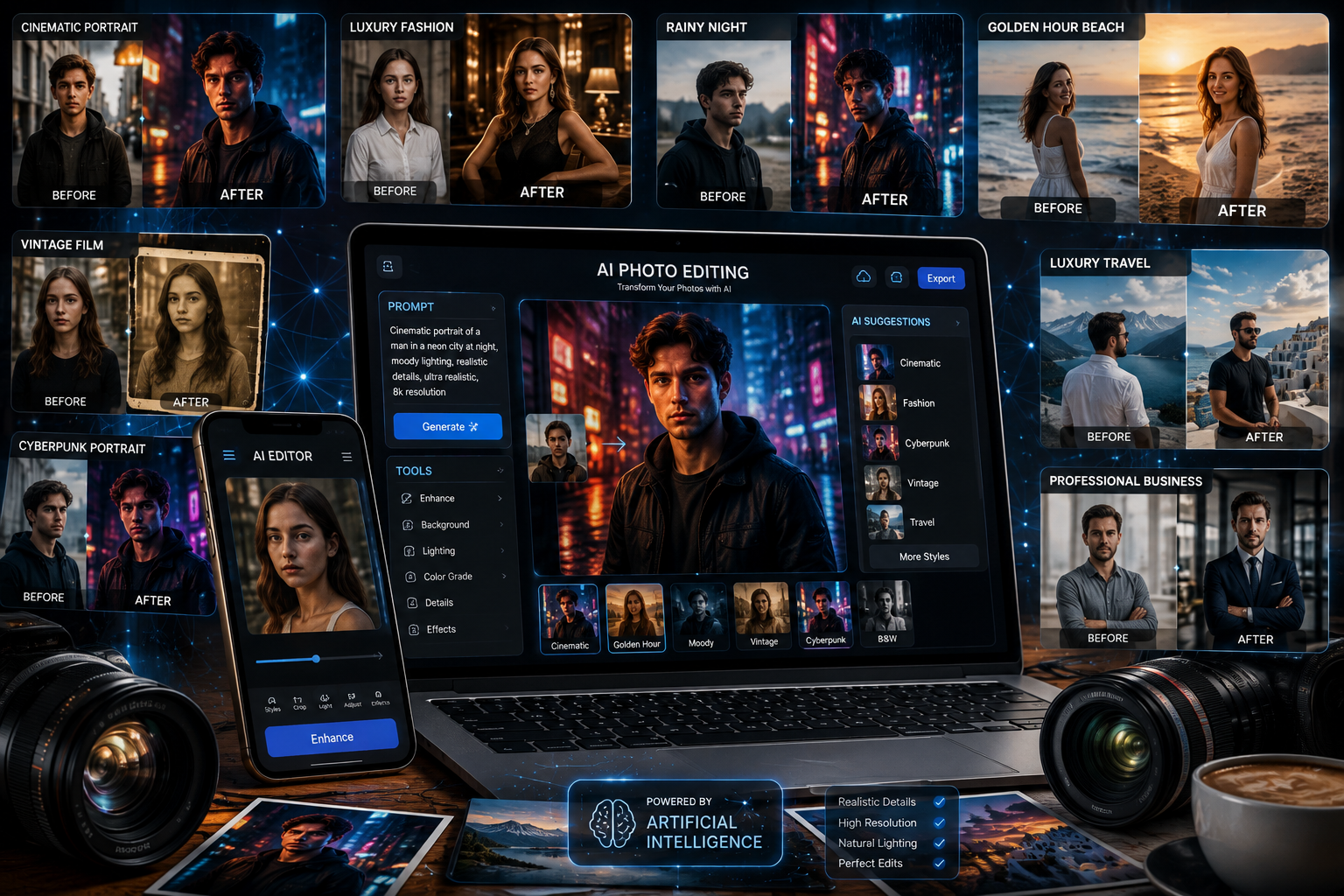
AI photo editing has changed the way people create eye-catching images. Instead of spending hours learning complicated editing software, users can now describe the changes they want in simple language and let AI handle the transformation. From cinematic portraits and luxury backgrounds to vintage effects and dramatic lighting, the right viral photo editing prompts can turn an ordinary picture into a professional-looking image within moments.
The biggest advantage is flexibility. You can upload an existing photo, describe the desired transformation, and ask an AI image editor to preserve important details such as your face, pose, clothing, and overall identity while changing the mood, environment, lighting, or visual style.
In this guide, you’ll find 10 viral edit photo/image prompts designed for popular AI image-editing workflows. These prompts are useful for social media posts, profile pictures, creative projects, personal branding, travel photos, and content creation.
The prompts can also be customized easily. Change the outfit, location, lighting, color palette, camera style, or atmosphere to create a result that matches your personality and purpose.
Viral photo editing prompts are detailed instructions that tell an AI image generator or editor how to transform an existing photograph.
Instead of manually adjusting dozens of settings, you can describe the desired result naturally.
For example, rather than asking:
Make my photo better.
You can write:
Transform this portrait into a cinematic evening photograph while preserving my facial identity, natural skin texture, hairstyle, facial proportions, and clothing. Add soft city lights in the background, realistic reflections, subtle rim lighting, shallow depth of field, and professional DSLR photography.
The second prompt gives the AI much more useful information.
A strong editing prompt generally contains:
Cinematic portraits remain one of the most popular AI photo-editing styles because they make ordinary pictures look like professional movie stills.
Edit this photo into a highly realistic cinematic street portrait. Preserve my exact facial identity, facial proportions, hairstyle, skin texture, and natural expression. Place me on a stylish city street at night with softly glowing storefronts, realistic traffic lights, wet pavement reflections, subtle mist, and blurred pedestrians in the background. Add dramatic but natural cinematic lighting, soft rim light around the subject, realistic shadows, shallow depth of field, professional 85mm lens photography, natural skin tones, detailed clothing textures, realistic reflections, premium editorial photography, photo-realistic result, no artificial-looking face.
This prompt combines cinematic lighting, realistic environmental details, and identity preservation. It is particularly effective for profile pictures, Instagram posts, and personal branding.
Luxury-style edits are highly effective when you want an ordinary photograph to look polished and sophisticated.
Transform this photo into a luxurious lifestyle portrait while keeping my face, body proportions, hairstyle, and identity completely natural and recognizable. Place me inside a sophisticated five-star hotel lobby with elegant marble floors, modern furniture, warm architectural lighting, large windows, and subtle golden highlights. Give the image a premium editorial photography appearance with realistic shadows, natural skin texture, sharp clothing details, balanced exposure, cinematic depth of field, high-end fashion photography, realistic colors, and an authentic luxury atmosphere. Do not make the image look artificial or overly edited.
Rainy photography creates a dramatic atmosphere without requiring an actual rainy location.
Edit my uploaded photo into a realistic rainy-night cinematic portrait. Keep my exact facial features, identity, hairstyle, clothing, and body proportions unchanged. Add a realistic urban street at night with gentle rainfall, water droplets on nearby surfaces, glowing neon signs, blurred headlights, wet pavement reflections, and soft atmospheric fog. Use natural cinematic lighting with subtle blue and warm tones, realistic shadows, shallow depth of field, detailed skin texture, realistic raindrops, professional street photography, 50mm lens appearance, high dynamic range, photo-realistic quality. Avoid excessive glow, plastic skin, or unrealistic facial changes.
For the most convincing result, ask the editor to add environmental reflections rather than simply placing a rain filter over the original photograph.
Golden-hour photography is popular because warm sunlight naturally creates a flattering and emotional appearance.
Transform this photo into a realistic golden-hour beach portrait. Preserve my exact face, facial structure, hairstyle, expression, clothing, and natural body proportions. Place me on a beautiful beach shortly before sunset, with warm sunlight coming from the side, gentle ocean waves, realistic sand texture, subtle wind movement, and a soft glowing horizon. Create natural golden rim lighting around the subject, realistic shadows, detailed skin texture, warm cinematic color grading, shallow depth of field, professional travel photography, realistic ocean reflections, and high-resolution photo-realistic detail. Keep the final image elegant and natural rather than overly saturated.
Golden-hour edits can make a simple portrait feel like a professional travel photograph while maintaining a natural appearance.
The sophisticated old money aesthetic has become a popular visual style for social media and fashion content.
Edit this portrait into an elegant old-money fashion photograph while preserving my exact facial identity, natural facial proportions, hairstyle, and realistic skin texture. Place me in a sophisticated European-style estate with classic architecture, refined furniture, neutral colors, and subtle natural lighting. Dress the subject in timeless luxury clothing with realistic fabric textures, elegant tailoring, and understated accessories. Use soft daylight, muted cream and brown tones, natural shadows, professional fashion photography, 85mm lens, shallow depth of field, subtle film grain, sophisticated editorial composition, realistic textures, and photo-realistic quality. Avoid excessive luxury logos or unrealistic styling.
This style works particularly well for:
Turn a normal portrait into something that resembles a professional fashion editorial.
Transform my uploaded portrait into a high-end fashion magazine editorial photograph. Preserve my exact identity, facial features, hairstyle, natural skin texture, and body proportions. Place the subject against a sophisticated minimalist studio background with professional soft-box lighting and subtle shadows. Create a premium fashion photography composition with sharp eyes, realistic skin pores, detailed hair, natural makeup, elegant styling, realistic fabric textures, shallow depth of field, 85mm portrait lens, balanced exposure, cinematic color grading, sophisticated editorial atmosphere, and ultra-realistic photographic detail. Keep the image believable and avoid artificial facial reconstruction.
After generating the image, you can request a second version with a different background color, outfit, or lighting setup while keeping the subject consistent.
For users who want something more futuristic, a neon city transformation can create a striking social media image.
Transform this photo into a highly realistic futuristic cyberpunk street portrait while preserving my exact face, identity, facial proportions, hairstyle, and natural expression. Place me in a futuristic city at night surrounded by realistic neon signs, illuminated buildings, reflective wet streets, subtle atmospheric fog, and distant pedestrians. Add magenta, cyan, and purple environmental lighting while keeping skin tones realistic. Use cinematic contrast, realistic reflections, detailed clothing textures, shallow depth of field, professional night photography, 50mm lens appearance, dramatic rim lighting, realistic shadows, high dynamic range, and photo-realistic detail. Keep the futuristic environment believable rather than cartoon-like.
This prompt is ideal for creative profile pictures, gaming content, futuristic branding, and social media artwork.
Vintage photography is another highly shareable style because it gives modern photos an emotional, nostalgic appearance.
Edit this photo to look like an authentic vintage film photograph while preserving my exact facial identity, facial proportions, hairstyle, clothing, and natural expression. Create the appearance of a professionally photographed 1990s film portrait with soft natural lighting, subtle film grain, slightly faded colors, realistic skin texture, gentle contrast, authentic analog imperfections, soft highlights, natural shadows, and a timeless composition. Add a subtle vintage color palette without making the image look damaged or artificially filtered. Simulate realistic 35mm film photography with natural exposure, realistic depth of field, and high-quality photographic detail.
Don’t ask the AI to add excessive grain or scratches. Subtle imperfections usually create a more convincing film photography effect.
A simple change of clothing and environment can dramatically transform an ordinary portrait.
Transform my uploaded photo into a sophisticated luxury black-suit portrait. Preserve my exact facial identity, facial structure, hairstyle, natural skin texture, and body proportions. Dress the subject in a perfectly tailored black suit with a crisp white shirt and subtle elegant accessories. Place the subject inside a modern luxury interior with dark marble, warm ambient lighting, sophisticated architectural details, and soft background blur. Use dramatic studio-quality lighting, realistic shadows, detailed fabric textures, natural skin tones, professional 85mm portrait photography, cinematic contrast, shallow depth of field, premium editorial style, and ultra-realistic photographic detail. Keep the final image natural, masculine, elegant, and believable.
This style works well for:
Travel-style edits can make a basic photograph appear as though it was captured during an expensive vacation.
Transform this photo into a realistic luxury travel photograph while preserving my exact face, identity, hairstyle, facial proportions, clothing details, and natural body shape. Place me at a breathtaking international travel destination overlooking turquoise water, dramatic mountains, and elegant architecture during golden hour. Create realistic environmental lighting that naturally matches the subject, subtle wind movement, detailed surroundings, realistic shadows, atmospheric depth, professional travel photography, 35mm lens, cinematic composition, natural skin tones, high dynamic range, realistic reflections, sharp subject detail, and photo-realistic quality. Make the scene look like an authentic professional travel photograph rather than an AI-generated image.
The best results don’t always come from making a prompt longer. Specificity matters more than unnecessary words.
When editing an existing photograph, tell the AI what must remain unchanged.
For example:
Preserve my exact facial identity and natural facial proportions.
This is usually more useful than repeatedly describing the person’s face.
You can also specify what should change:
Change only the background and lighting while keeping the subject unchanged.
This gives the AI a clearer editing boundary.
Lighting can completely change the appearance of a photograph.
Try descriptions such as:
Camera terminology can help establish the photographic appearance you want.
For example:
You don’t have to copy existing prompts every time.
Use this simple structure:
Edit instruction + subject preservation + environment + lighting + camera style + mood + realistic details + quality
For example:
Transform this portrait + preserve my exact identity + place me in a luxury hotel + warm evening lighting + 85mm photography + sophisticated mood + realistic skin and fabric textures + photo-realistic editorial quality.
This formula makes it much easier to create customized AI photo editing prompts.
Even a detailed prompt can produce disappointing results if the instructions are unclear.
Avoid these common mistakes:
Don’t ask for both dramatic darkness and bright daylight unless you clearly explain how the lighting should work.
If you want to preserve your identity, avoid requesting major changes to your face, hairstyle, age, body shape, and clothing simultaneously.
A new background may look unrealistic if its lighting doesn’t match the original subject.
Quality keywords can help, but repeating them doesn’t automatically improve an image. Focus on specific visual details instead.
When editing personal photographs, clearly state which features should remain unchanged.
| Goal | Useful Prompt Elements |
|---|---|
| Professional portrait | 85mm lens, studio lighting, shallow depth of field |
| Travel photo | 35mm lens, golden hour, environmental photography |
| Cinematic image | Rim lighting, dramatic shadows, cinematic color grading |
| Vintage photo | 35mm film, subtle grain, faded colors |
| Luxury image | Editorial photography, elegant architecture, refined styling |
| Night portrait | Neon lighting, wet pavement, realistic reflections |
| Fashion photo | Studio lighting, detailed fabric, editorial composition |
| Nature photo | Natural light, atmospheric depth, realistic textures |
Viral edit photo/image prompts are detailed AI instructions designed to transform existing photographs into visually striking images. They can change backgrounds, lighting, clothing, atmosphere, colors, and photographic styles while preserving important features.
Yes. Upload your photograph to an AI image-editing tool and adapt the prompt to specify which elements should remain unchanged and which should be transformed.
Use realistic lighting, natural skin texture, accurate shadows, environmental reflections, appropriate camera perspectives, and consistent depth of field. Also tell the AI to avoid artificial facial changes.
Yes. For better control, explicitly state:
Change only the background while preserving the subject, face, clothing, pose, and lighting.
This makes the intended editing boundary clear.
Cinematic portraits, golden-hour travel edits, old-money fashion, rainy-night photography, and luxury lifestyle portraits are particularly effective for visually engaging social media content.
Absolutely. Change the location, outfit, lighting, camera lens, color palette, mood, and composition to create a unique result.
The right viral photo editing prompts can transform ordinary photographs into polished, creative, and highly engaging images without requiring advanced photo-editing skills. Whether you want a cinematic street portrait, luxury fashion image, vintage film effect, futuristic city scene, or professional travel photograph, a well-structured prompt gives AI a much clearer understanding of your creative direction.
The key is to describe what should change and what should stay the same. Preserve identity when necessary, match the lighting to the environment, describe realistic textures, and choose a camera style that fits the scene.
Start with the 10 prompts in this guide, then experiment with your own combinations. Once you understand how subject, environment, lighting, camera perspective, and mood work together, you can create virtually unlimited AI photo-editing concepts for social media, blogs, portfolios, and personal projects.